


Key Features of the Rotate ICO Image Tool
Rotate Icons at Any Angle
TrimIMG allows an easy rotation of ICO images. It is possible to rotate in a single click. This also assists in repairing icons that are displayed sideways.
Custom Angle Rotation
It is also possible to move an ICO image at an angle of your choice. This choice places all the control of the icons.
Designers frequently use this capability to tweak the arrangement and positioning of icons in UI designs or web-based projects.
Rotate Multiple ICO Images
IMGTrim supports rotating in batch mode. You are allowed to load multiple ICO files and rotate them.
This helps save time when working with a large collection of icons for apps and software interfaces.
Flip ICO Images Horizontally or Vertically
Flipping icons is also possible horizontally or vertically. This option is useful for creating duplicate icons or correcting design alignment.
It finds application in graphic designing, icon editing, and adjustments of UIs.
Supported Image Formats
The tool is flexible and supports various image formats.
This gives the tool flexibility to edit images and change icons.
Secure and Private Image Processing
Your files stay private. TrimIMG processes images securely in your browser.
The pictures placed as ICOs are not permanent. Processing is done automatically, and then the files are deleted. Your icons remain safe and private.
Fast and Easy Interface
The tool is not complicated and is user-friendly. Any person can rotate images without any technical expertise.
Upload the icon. Select the rotation option. Instantly download the fixed icon.
How to Rotate an ICO Image Online
It will not take many simple steps to turn an ICO image.
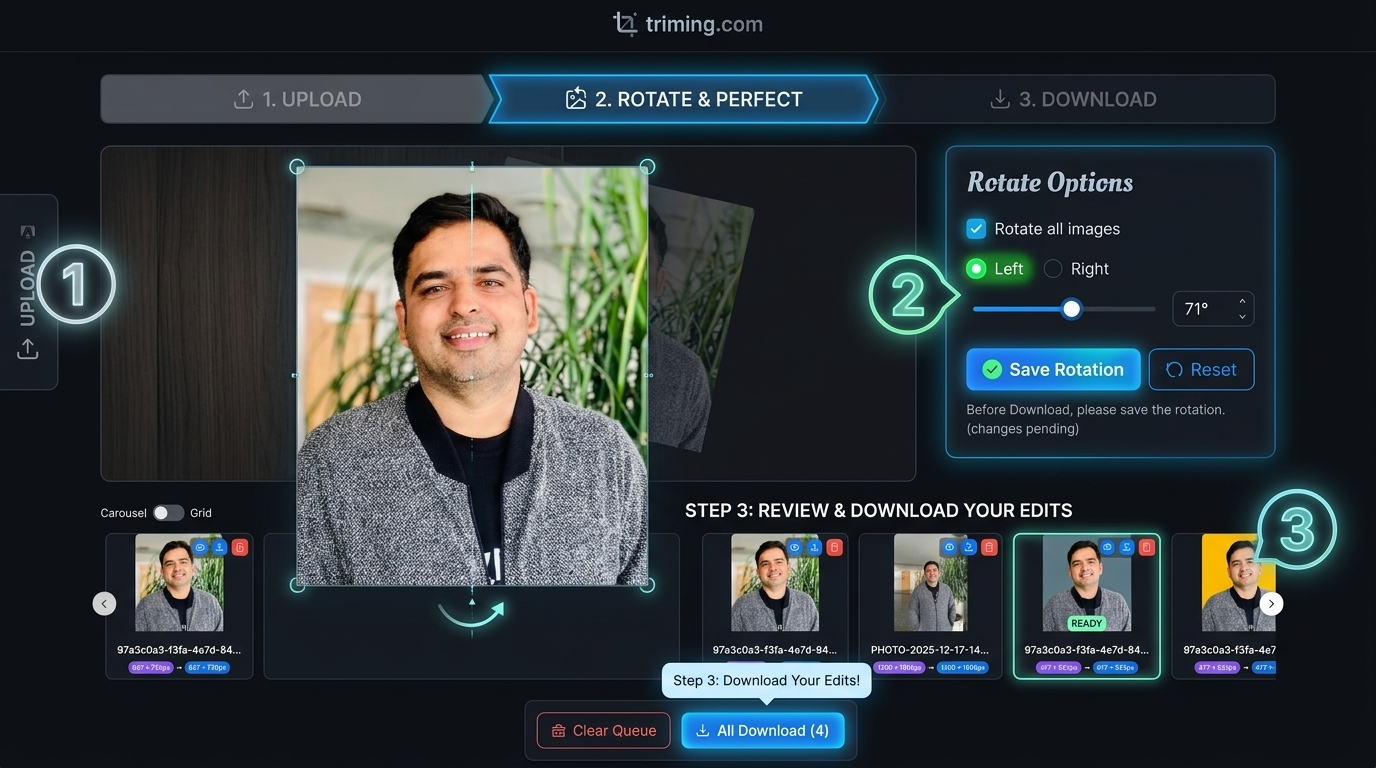
- Drag your ICO picture to the TrimIMG rotate image.
- Select rotation angle (90 deg, 180 deg, or 270 deg).
- It is also possible to determine a custom rotation angle.
- Preview the rotated icon.
- Instantly download the new ICO file.
Everything works online. No installation is required.
Why Choose TrimIMG to Rotate an ICO Image?
TrimIMG is an image rotator that is fast and stable. The tool retains original icon quality. Numerous editing programs compress icon files during processing.
It is browser-based and can be configured to work with many different formats. It is quick and easy. You are fixing a favicon orientation, editing, or tweaking UI icons, or any software icons.



